RouteOne GO: Truck Navigation
Route One GoMaps & Navigation
4.25.00 Reviews
- Version
- 1.0.33
- Installs
- 10.00K
- Age Rating
- Everyone
Screenshots
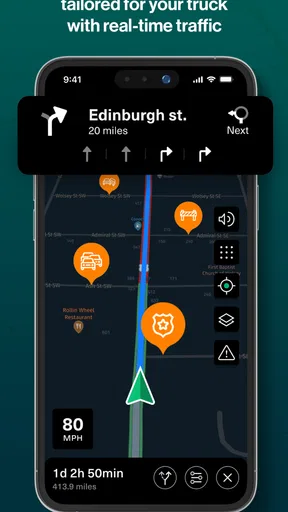
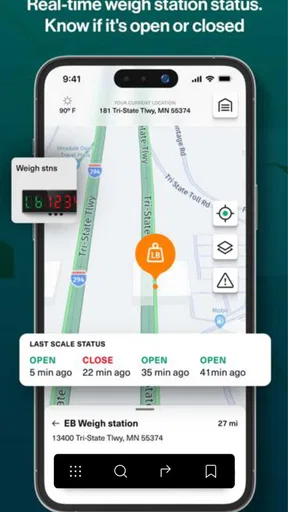
Our Review of RouteOne GO: Truck Navigation
 Analysis by Appyee
I spend a lot of time judging navigation apps by what happens after the route is chosen. A clean map is useful, but a truck driver needs more than a line between two points: the route has to make sense from the cab, remain readable at a glance, and support decisions when attention is already divided. RouteOne GO: Truck Navigation is a free Maps & Navigation app from Route One Go that aims at that particular job. I found its focus more practical than a general phone-navigation app, especially when fuel planning and suitable stopping points matter as much as arrival time.
The app is listed for Everyone, runs on Android devices using version 8.0 or later, and its current version is 1.0.33. It has reached over ten thousand installs and holds a 4.2 average from 46 ratings, with five written reviews. Those numbers suggest a small but interested user base rather than a mature, universally tested platform. I would approach it as a focused tool worth trying, not as an automatic replacement for every navigation system already in a driver’s routine.
How RouteOne GO works when the road, vehicle and driver all matter
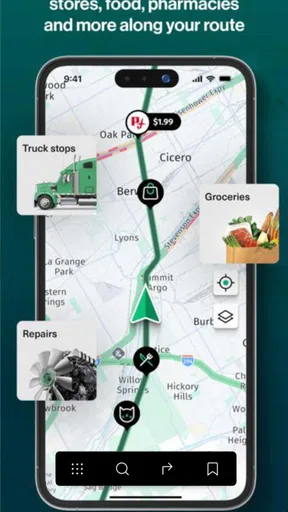
I find the most useful way to assess a truck-navigation app is to look beyond the route line and ask how it helps a driver plan the whole journey. Here, the emphasis on fuel costs and important stops gives route planning a practical second layer: it can help turn a long drive into stages that are easier to consider before setting off. That makes the next question less about what the app promises and more about how to fit its guidance into a real working routine.
Readable guidance is more important than a crowded map
My first concern with a truck-navigation app is whether it reduces mental work. A driver should not have to decode a busy screen while approaching a junction, compare several small labels, or remember a long sequence of instructions. RouteOne GO’s purpose is clear: it is built around truck routes, fuel costs and important stops rather than treating a large vehicle like an ordinary car. That focus gives the app a useful starting point for professional journeys.
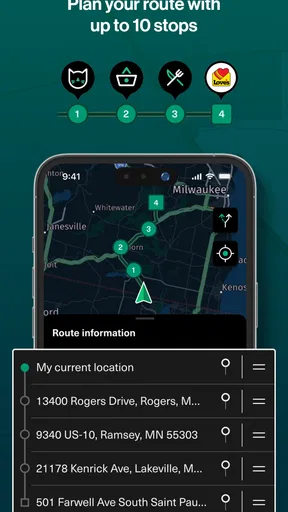
I would use it before moving, not only after the cab is already on the road. Entering the destination and checking the proposed journey in advance creates an opportunity to think about where fuel or a break might fit. This is one of the app’s more valuable ideas: navigation becomes part of trip preparation instead of a series of last-second prompts. For a driver who works from a repeatable checklist, the app can sit between dispatch instructions and the actual drive.
Readability is also a question of hierarchy. The most useful information should be the next action, while cost estimates and stop planning should support that action without taking over the screen. I would keep the phone mounted in a stable, familiar position and review the route while parked. That habit matters for every navigation app, but it matters even more when a truck’s turning space and stopping options are less forgiving than a car’s.
A practical workflow is to check the whole journey first, identify the sections where a wrong turn would be expensive, and then confirm the planned fuel or rest opportunities. I would not treat a suggested stop as a command. A stop that looks convenient on a map may be unsuitable because of opening conditions, vehicle access, congestion or the driver’s working schedule. The app can help organize the decision, but the driver still needs to judge the real situation.
Fuel planning adds a useful layer to ordinary directions
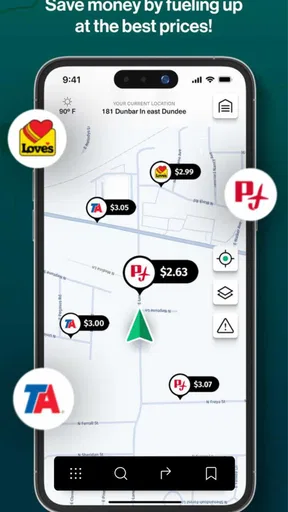
Many general navigation apps are good at finding a route but leave fuel planning to the driver. RouteOne GO puts fuel costs among its central concerns, which is a meaningful difference for anyone managing a heavy vehicle. Even without turning the app into a full fleet-management system, that emphasis encourages a better question than “How fast can I get there?” The question becomes “What will this route require from the vehicle and the budget?”
I see the strongest use case on long trips with several possible roads. A slightly shorter route is not automatically the best one if it creates awkward fuel timing or leaves too few sensible places to stop. Comparing the route with the planned fuel points can reveal a trade-off that a standard car-focused app tends to hide. This is especially helpful when a driver wants to avoid improvising near the end of a tank or searching for a suitable location while tired.
There is a small but important discipline here: fuel-cost planning is only as reliable as the assumptions behind it. I would check that the vehicle’s actual consumption, load and driving conditions are reflected in whatever information I enter or use. Weather, traffic, gradients and idling can change the result. I would use the cost view for planning and comparison, not as a promise of an exact final bill.
The same principle applies to key stops. A route that appears efficient may be uncomfortable if it offers no sensible pause at the right time. I would mark the points that matter before departure, then keep a backup option in mind. That is a non-obvious benefit of using a truck-focused planner: it encourages the driver to think about the journey as a sequence of manageable stages rather than one uninterrupted line.
Different abilities change what “easy to use” means
For drivers with reduced visual acuity, readability is not just about font size. Contrast, spacing, uncluttered instructions and the ability to recognize the next action quickly all make a difference. I would test the app in daylight, in low light and with the phone at the actual mounting distance. A display that feels comfortable in the hand may be difficult to read from the driver’s seat, particularly when glare or vibration is involved.
Drivers with hearing loss may depend more heavily on visual guidance, so I would not assume that sound alone is enough. Before leaving, I would confirm that the route can be followed from the visible information and that the phone’s position does not hide the relevant instruction. Conversely, a driver who finds visual scanning tiring may prefer to rely more on spoken prompts if the device and app provide them in a usable way. I would test that arrangement while parked rather than discovering its weaknesses during a complicated turn.
Motor considerations are just as important. A person with limited hand movement, tremor or difficulty making precise taps may find repeated route adjustments frustrating. My advice would be to prepare the journey as completely as possible before driving, avoid unnecessary interaction once moving, and keep the phone within easy reach without creating a distraction. The app’s value is highest when it supports a preplanned route, not when it requires constant correction.
For cognitive accessibility, predictable routines help. I would use the same sequence each time: set the destination, inspect the route, review fuel needs, note the important stops, and start only after the screen is ready. That routine reduces the number of decisions made under pressure. A driver who becomes overwhelmed by changing instructions may still need a second navigation source or a printed dispatch plan for reassurance, particularly on unfamiliar roads.
Situational access matters in a working truck
Truck navigation is used in conditions that are physically and mentally demanding. The driver may be tired, operating in rain, dealing with a noisy cabin, wearing gloves, or preparing to enter an unfamiliar industrial area. These conditions expose weaknesses that are invisible during a calm test at home. I would judge RouteOne GO by how little attention it demands at those moments.
Consider a realistic delivery day. I would review the destination before departure, check whether the route leaves room for a planned fuel stop, and identify a safe place to pause before the final approach. If traffic builds, I would resist changing the route while moving. I would pull over, reassess the route and compare the new option with the original plan. That workflow protects the app’s strengths while avoiding the common mistake of treating live navigation as a substitute for judgment.
For a driver with limited stamina, the stop-planning angle can be more valuable than a small saving in travel time. A route broken into sensible stages may be easier to manage than one that looks efficient but demands a long uninterrupted stretch. Someone with diabetes, chronic pain or another condition requiring regular breaks can use the planning concept to make the journey more predictable, although the app should not be treated as a medical or workplace scheduling tool.
For drivers who are sensitive to visual motion or screen clutter, I would keep the display simple and avoid interacting with it more than necessary. A passenger can handle route changes when one is available; otherwise, stopping safely is the better choice. This is not a criticism unique to RouteOne GO, but a truck-oriented app has to fit into a more demanding environment than a casual city map.
Where it compares well with ordinary navigation apps
The clearest reason to choose RouteOne GO is its truck-centered perspective. A typical phone map is often excellent for finding addresses, checking traffic or walking through a city, but it may make the driver do the work of translating a general route into a heavy-vehicle plan. Fuel costs and key stops are not merely decorative additions; they change how I think about the trip.
On the other hand, a general navigation app may be the better companion for local errands, pedestrian access, public transport or discovering businesses around a destination. If I am driving a normal car through a familiar area, the extra truck-planning focus may not justify changing tools. Likewise, a professional fleet may require dispatch communication, compliance records, detailed vehicle profiles or other operational controls that are outside the experience of a focused navigation app.
I would therefore use this app selectively rather than insist on one application for every journey. RouteOne GO makes more sense for planning a truck route and its practical pauses. A familiar map app can remain useful for the last short approach, address verification or checking nearby services. Keeping both roles separate can be safer than forcing one app to handle every type of navigation.
Small details that can improve the daily workflow
One useful habit is to compare the planned route with the driver’s actual schedule before starting. A route may be technically efficient but poorly timed if its key stop arrives too early or too late. I would review the trip in terms of stages, then decide which stops are essential and which are merely convenient. That distinction prevents a driver from mistaking every suggested location for a requirement.
A second habit is to use fuel planning as a warning system rather than a target. I would leave room for traffic, detours and vehicle conditions instead of planning to arrive at a fuel point with no margin. The app’s cost emphasis is most helpful when it encourages early decisions. It is less helpful if it tempts someone to stretch the vehicle’s range for a small apparent saving.
A third is to prepare for handoffs. If more than one person may drive the truck, I would agree on the route, fuel plan and important stops before the journey begins. That makes the app part of a shared plan rather than a personal screen that only one driver understands. It also helps a relief driver who may have different visual, hearing or motor preferences and needs the route presented in a predictable way.
These habits reveal the app’s real value: not simply showing directions, but giving a driver a framework for thinking ahead. That framework is particularly useful when accessibility needs make improvisation more tiring. Preparation cannot remove every barrier, but it can reduce the number of rushed actions and unclear choices.
Remaining barriers and sensible expectations
I would keep expectations realistic because the app is still a relatively small product. Its 4.2 average comes from a limited pool of ratings, so I would test it on a familiar route before trusting it for an important delivery. The developer is Route One Go, and the app was released on November 20, 2024, which places it in an early stage compared with long-established navigation brands. Early testing is especially sensible for drivers who depend on consistent workflows.
The free price makes trying it straightforward, but in-app purchases are listed at $12.99 per item. I would check what an optional purchase provides and whether it is relevant to my own driving before paying. The free entry point is appealing for evaluation, while the purchase structure means a user should not assume every planning capability is included without checking the app’s current screens.
Another barrier is the gap between planning information and real-world suitability. A route can be sensible in general terms and still be wrong for a particular truck, load, delivery restriction or driver schedule. I would always follow posted road signs and local restrictions, and I would avoid making a route change while the vehicle is moving. No navigation display can replace the driver’s responsibility to observe the road.
Accessibility also has a personal side. The same screen may be clear to one person and tiring to another. Someone with low vision should test the app at the mounting distance; someone with hearing loss should confirm that visual cues are sufficient; someone with limited dexterity should minimize taps; and someone who becomes anxious with changing instructions should prepare the route before departure. These are practical tests, not assumptions about what the app can guarantee.
I would skip RouteOne GO if I wanted a complete fleet-management platform, a navigation tool for every travel mode, or a system that removes the need to verify truck suitability. I would also hesitate to make it my only option on a high-stakes first trip without a trial run. Drivers who mainly need basic car directions may find a general map app simpler, while truck drivers who value route staging and fuel awareness have a stronger reason to explore this one.
My inclusive verdict
After looking at it as both a truck planner and a tool used by people with different abilities, I see RouteOne GO as a promising focused option rather than a universal answer. Its strongest contribution is the way it brings route choice, fuel thinking and important stops into the same driving conversation. That can reduce mental load for a prepared driver and make long journeys easier to divide into clear stages.
I especially recommend trying it if you drive a truck regularly, prefer to plan before leaving, and want more context than a basic car-navigation screen usually provides. It may also suit drivers who benefit from predictable routines, provided the display and interaction style work for their eyesight, hearing, hand control and concentration needs. The best results come from reviewing the route while parked and treating the app as a planning aid rather than an unquestionable authority.
I would be more cautious for occasional users, drivers with complex fleet requirements, and anyone expecting guaranteed accessibility or perfectly tailored vehicle guidance. The relatively young product, small review base and optional purchase model justify a careful test on ordinary journeys first. Still, the free download and Everyone age rating make that evaluation easy to approach.
My final view is favorable but measured: RouteOne GO is most useful when it helps a driver make fewer rushed decisions. It does not replace road awareness, vehicle knowledge or personal accessibility adjustments, but its truck-specific priorities give it a meaningful purpose. If those priorities match the way you work, I would add it to a trial route and judge it from the cab, in real conditions, before deciding whether it deserves a permanent place in your navigation routine.
RouteOne GO: Truck Navigation is available as a free app, with optional in-app purchases priced at $12.99 per item.
Verdict
Strengths of RouteOne GO: Truck Navigation
- Truck-focused routing helps avoid roads unsuitable for large vehicles.
- Clear turn-by-turn guidance is useful during long-haul trips.
- Route planning can account for vehicle dimensions and weight limits.
- Large map elements are easier to read from a mounted phone.
- Helpful for drivers who need an alternative to standard car navigation.
Limitations of RouteOne GO: Truck Navigation
- Coverage and routing accuracy may vary by country or rural area.
- Some advanced navigation features may require a paid subscription.
- Truck restrictions can change before map data is updated.
- The app may use significant battery and mobile data on long journeys.
- A stable GPS signal is needed for reliable guidance and location updates.
Similar Picks in This Category
View All
Uber - Request a ride
Uber Technologies, Inc.4.7


inDrive. Rides with fair fares
® SUOL INNOVATIONS LTD4.8

Yandex Go: Taxi Food Delivery
Mikromobilnost LLC Belgrade4.8

Bolt: Request a Ride
Bolt Technology4.8

Rapido: Bike-Taxi, Auto & Cabs
Rapido Bike Taxi4.8
Frequently Asked Questions
What is RouteOne GO: Truck Navigation designed for?
RouteOne GO is designed specifically for professional truck drivers and other commercial vehicle operators who need navigation adapted to the dimensions and restrictions of their vehicles. Instead of treating a truck like a standard car, the app can help plan routes with factors such as vehicle height, weight, length, and road limitations in mind. This makes it more suitable for deliveries, long-haul journeys, and fleet-related travel than ordinary navigation apps.
Can I enter my truck’s dimensions and weight into RouteOne GO?
Yes, the main benefit of a truck-focused navigation app is the ability to create a vehicle profile using relevant specifications, such as height, width, length, weight, and axle information where supported. Entering accurate details is essential because the suggested route depends on them. Before starting a trip, drivers should carefully check that the profile matches the actual vehicle, trailer, and current load to reduce the risk of unsuitable roads or restricted passages.
Does RouteOne GO work without an internet connection?
Offline availability can depend on the app version, region, and the maps or services included with your subscription. Drivers should not assume that every feature will work without mobile data. If offline maps are offered, they generally need to be downloaded before departure while a reliable connection is available. Live traffic, road closures, weather information, and other connected tools may still require internet access, so preparation is important before entering areas with weak coverage.
Is RouteOne GO suitable for all countries and truck routes?
Route coverage and the quality of truck restrictions can vary by country, region, and map provider. The app may be especially useful in supported areas, but users should confirm that their intended destinations and local regulations are included before relying on it for a demanding journey. No navigation application should replace road signs, official restrictions, low-clearance warnings, or instructions from a dispatcher, particularly when driving an oversized or heavily loaded vehicle.
Is RouteOne GO free to download, and are there extra costs?
The application may be available to download at no initial cost, but some navigation functions, map access, traffic services, or professional tools can require in-app purchases or a subscription. Pricing and included features may differ between Android and iOS and can change over time. Before beginning a trip, review the current store listing and subscription terms carefully, including renewal conditions, trial periods, and whether the available plan covers commercial truck navigation in your area.
